Paircaster runs a Farcaster node on your own machine, which needs about 800 GB of disk and a day or more before it is ready, and a command-line client, paircaster, that reads from that node and posts through it. This page hands the client to your AI agent. Not set up yet? Start at the quickstart.
Before you start: a node that paircaster node status reports ready, and paircaster on your PATH, both from the quickstart. For writes, a test account made in the Farcaster app (Safety) and an app key for it, which you add yourself in your own terminal (Adding an app key).
The skill
The repository's skill/ directory is an agent skill: instructions an AI agent loads before it runs paircaster. The agent runs the same commands you do, with --json, and has the same limits: no search command, only the last three days or so of the network's messages from paircaster events to filter, and nothing older than an account's newest 1000 messages.
Claude Code finds the skill in the clone. From the directory you cloned into:
cd paircaster
claude
It loads the skill from .claude/skills/paircaster, a link to skill/, with nothing to copy. Asked “How far behind is my Farcaster node?”, it loads the skill on its own and runs paircaster node status --json. What you can do with it has more questions, with the agent's answers. Another agent can be told to read skill/SKILL.md.
Codex loads the skill from .agents/skills/paircaster, another link to skill/. Its default sandbox blocks network access, localhost included, so paircaster cannot reach the node and says so. Allow network access for the session:
codex exec -s workspace-write -c sandbox_workspace_write.network_access=true "How far behind is my Farcaster node?"
Your node is **syncing**. Shards 0 and 1 are about **2 seconds behind**; shard 2 is about **49 minutes 38 seconds behind**. So shard 2 is the lagging one.
It read the skill and ran paircaster node status --json to answer. Under the default sandbox, paircaster node status fails with:
error: not permitted to connect to http://localhost:3381, so the node's state is unknown; an agent's sandbox may be blocking network access for paircaster
On Windows, git checks both links out as plain files unless symlinks are enabled (core.symlinks), and then the skill does not load.
What the skill tells the agent
- Check the node first. Run
paircaster node statusbefore reading, and say how far behind the node is in every answer. - Reads only, until you say otherwise. It runs no write until you tell it, in that conversation, that it may write, and that lasts for the conversation only.
- You approve Paircaster's text, not the agent's. For each write it runs the command with
--dry-run, shows you the textpaircasterprinted, exactly as printed, and waits for your yes before running it again with--yes.paircasterwrites that text from the message it signs, so within one run it cannot show one thing and send another. The two runs are separate commands, though: the--yesrun prints the text again from what it actually sent, and the skill shows you that too, so check that it matches what you approved. - Never a recovery phrase. It never runs
key add, never asks for a phrase, and refuses one if it is pasted in: you runkey addin your own terminal. Refusing does not undo a paste: the phrase has already gone to the model's provider, so treat that account as exposed and stop using it.
The writes in Using the client were sent by an agent following these steps.
Gating writes in your harness
Each write is its own command, so your agent's harness can let reads run, ask before each write, and refuse paircaster key. In Claude Code, a deny rule for Bash(*paircaster key *) refused the agent's paircaster key --help; rules that ask before a write have not yet been seen to prompt.
Building the viewer
The viewer is a page in your browser that you and your agent look at together. The easiest way to build it is to ask your agent, in the clone, as in the quickstart: “Install Paircaster here, with the viewer.” It skips what your machine already has and builds paircaster again with the viewer. Then go on to starting the page. The same steps by hand follow.
The page is built into paircaster only with the viewer feature, which the quickstart's build leaves out: building the page needs tools the rest of paircaster does not. They are Bun, the WebAssembly target, and wasm-bindgen-cli at the same version as the wasm-bindgen in Cargo.lock. Install Bun with the command on its home page (on Linux it needs unzip), then open a new terminal so that bun is on your path. From the clone, find the wasm-bindgen version:
grep -A1 'name = "wasm-bindgen"' Cargo.lock
name = "wasm-bindgen"
version = "0.2.129"
Then build, with that version in the second line:
rustup target add wasm32-unknown-unknown
cargo install wasm-bindgen-cli --version 0.2.129 --locked
cd viewer && bun install --frozen-lockfile && bun build.ts && cd ..
cargo install --path crates/cli --locked --features viewer
dist/: index.html 9934 bytes, viewer.js 1277854 (wasm 912374)
bun build.ts prints the line above; the other steps print their usual output.
With the viewer built, start the page.
Looking at a thread together
The agent can show you a thread instead of describing it: a page in your browser that reads your node, where you follow replies and go back without the agent. When you click a cast, the agent can read which one you chose. You and the agent are looking at the same page.
You start the page
Ask the agent in plain words. In this section the prompts are as typed, and the replies as the agent wrote them:
Start the viewer with profile pictures so we can look at threads together.
It ran paircaster viewer serve --images in the background and answered:
The viewer is running with profile pictures on. Open this address in your browser:

http://127.0.0.1:62331/?pair=d378d2db50a261591237c7a8507453a1bd6bea3b9a1fa1b8e2a8c4244acf2ef4

With pictures on, each one loads from whatever server that account chose for it. Those servers can see your IP address and when you looked.

The page is blank until there's a thread on it. Name a cast or a conversation and I'll put it up, or click a cast on the page and I can see which one you picked. It keeps running until I stop it or this session ends.
You can also start it yourself, in a terminal of its own since it keeps running:
paircaster viewer serve
open the viewer at http://127.0.0.1:63677/?pair=42909cb06db6d5baacdcceccccf3ecbe769860af1788d5515b7d2a632033ff1d
stop it with Ctrl-C
It listens on 127.0.0.1 only, and the page can reach only the node paircaster reads from. The address carries a token; a page opened without it is refused. The agent needs neither the address nor the token: its viewer commands reach the server through a local socket that only your user account can open.
The agent shows you a thread
Find Dan Romero's wishlists for a Farcaster client and a Snapchain node, and show me the client one.
It searched his newest casts, ran paircaster viewer open 3:0x597007de6219f87fdf71ad5769db542c8f2d1dde, and answered:
The viewer now shows Dan Romero's client wishlist with its 16 replies. He posted it on 16 October, starting with "Client wishlist", and it's a top-level post, so it isn't replying to anything.

His Snapchain node wishlist went up seven minutes later, starting with "Snapchain node wishlist". It asks for two things: to sync only part of the network, and to keep no more than 7 days of content. I can put that one on the page too.

I found both by searching his newest 1,000 casts for "wishlist", "client" and "node". Your node is caught up, so nothing recent should be missing.
Only what is worth reading
Show me just the replies worth reading.
It read the replies with paircaster replies --json, and the replies to four of them, chose six, and opened the thread with those first, in its order, under a caption it wrote:
paircaster viewer open 'paircaster://paircaster/thread/3:0x597007de6219f87fdf71ad5769db542c8f2d1dde?only=3:0x660b6bf526a5d977b2cabcfebbfb350f700ec21f,10695:0x01e2c6a1839d389c824ad1550f3b6c2c817abb99,516505:0x0896e38bb856e0859090c4e0a39f7941cc3ceea5,3036:0x459499297ad8d9be01ca88a4c1124e05766d38d4,8332:0x9263e9b11e1c8cfb2a946299098caeb61b229dd0,4167:0x67b18976a4cb53aeb36687f4813b7bbcf5184df1&caption=6%20of%2016%20replies%20worth%20reading%2C%20best%20first#cast=3:0x40a0d26b7ea3c4ef79b1f574ff2261a535cb84c6'
The other ten fold into one line below them, which opens with a click. #cast= marks Dan Romero's answer to one of the six, which the page draws nested under it. The reply names each cast by its author and a few of its words, so you can find it on the page, and says why it chose it (the caption sits above the cast, scrolled out of this shot):
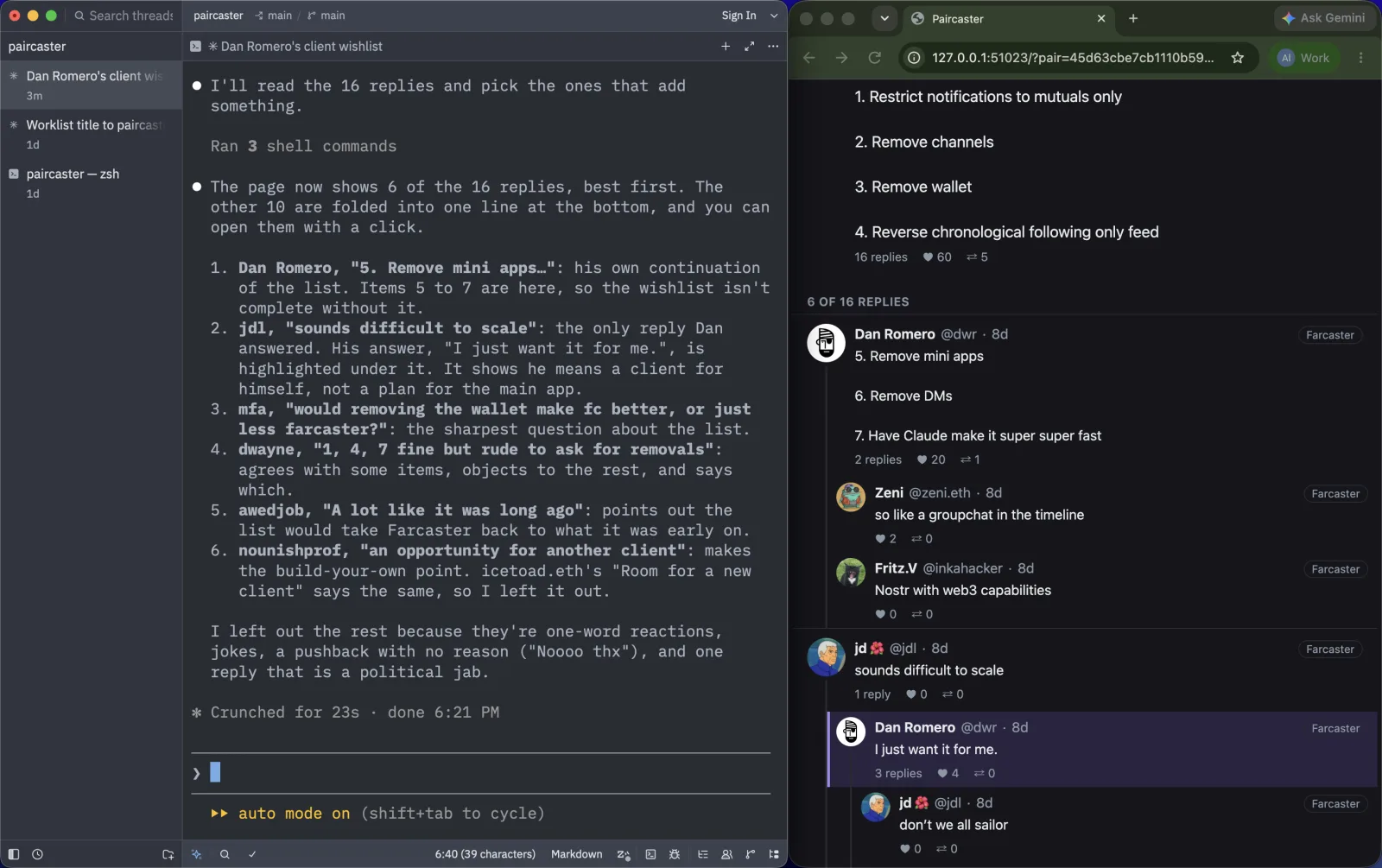
Each card shows its replies, likes and recasts once the page has read them. Replies nest under the reply they answer, three levels deep (two in a narrow pane), and a deeper reply ends in "Continue this thread"; long runs of replies fold into one line you open with a click; a quoted cast shows as a small card; resting the pointer on an author shows their bio and follow counts.
You point, the agent reads
Now show me the node wishlist
It opened that thread. In the page, click KMac's reply, "Yes & filter only from specific signers": the page opens the reply's own thread, under the post it answers. Then ask about it:
What does the person I've selected want, and can Paircaster do it?
The agent learns what you clicked only when it runs viewer state, and it ran that first:
told paircaster
message: the thread of 4163:0x45563785c747be1f0c407defdae26e3b5d4f596b by @kmacb.eth ("Yes & filter only from specific signers"), 1 cast above it, 0 replies
result: {"back":["3:0x35f104e944de03c93cc4eb513e8b84cef58d9b77"],"caption":null,"cast":"4163:0x45563785c747be1f0c407defdae26e3b5d4f596b","continued":[],"depth":3,"folded":[],"node":"http://localhost:3381","selected":null,"user_marked":null,"user_selected":"paircaster://paircaster/thread/4163:0x45563785c747be1f0c407defdae26e3b5d4f596b","view":"thread"}
user_selected and user_marked are what you chose, and only you change them; the rest says what is on screen. It answered:
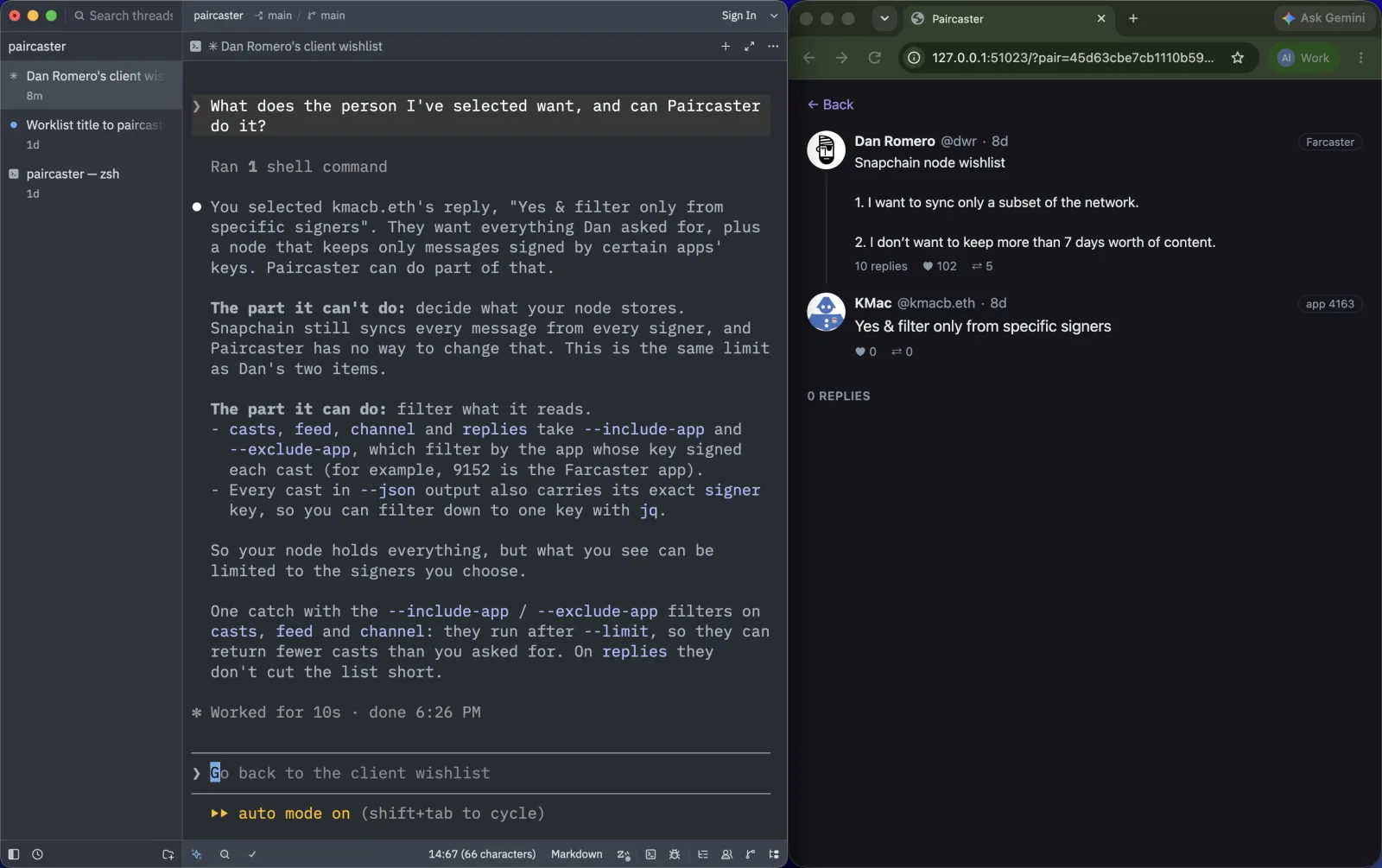
Several at once
Press Back to return to the node wishlist, then hold Cmd (Ctrl elsewhere) and click two of trish's replies, "I might like this except I can't" and "So very banned": each is marked, and the page stays where it is. Shift-click marks every cast between the last one you pointed at and this one. Then:
What do the ones I marked have in common?
viewer state gave them to the agent as user_marked, in the order you marked them.
It read both casts with paircaster show, the thread of the second, and the profile of the app that signed them, and answered:
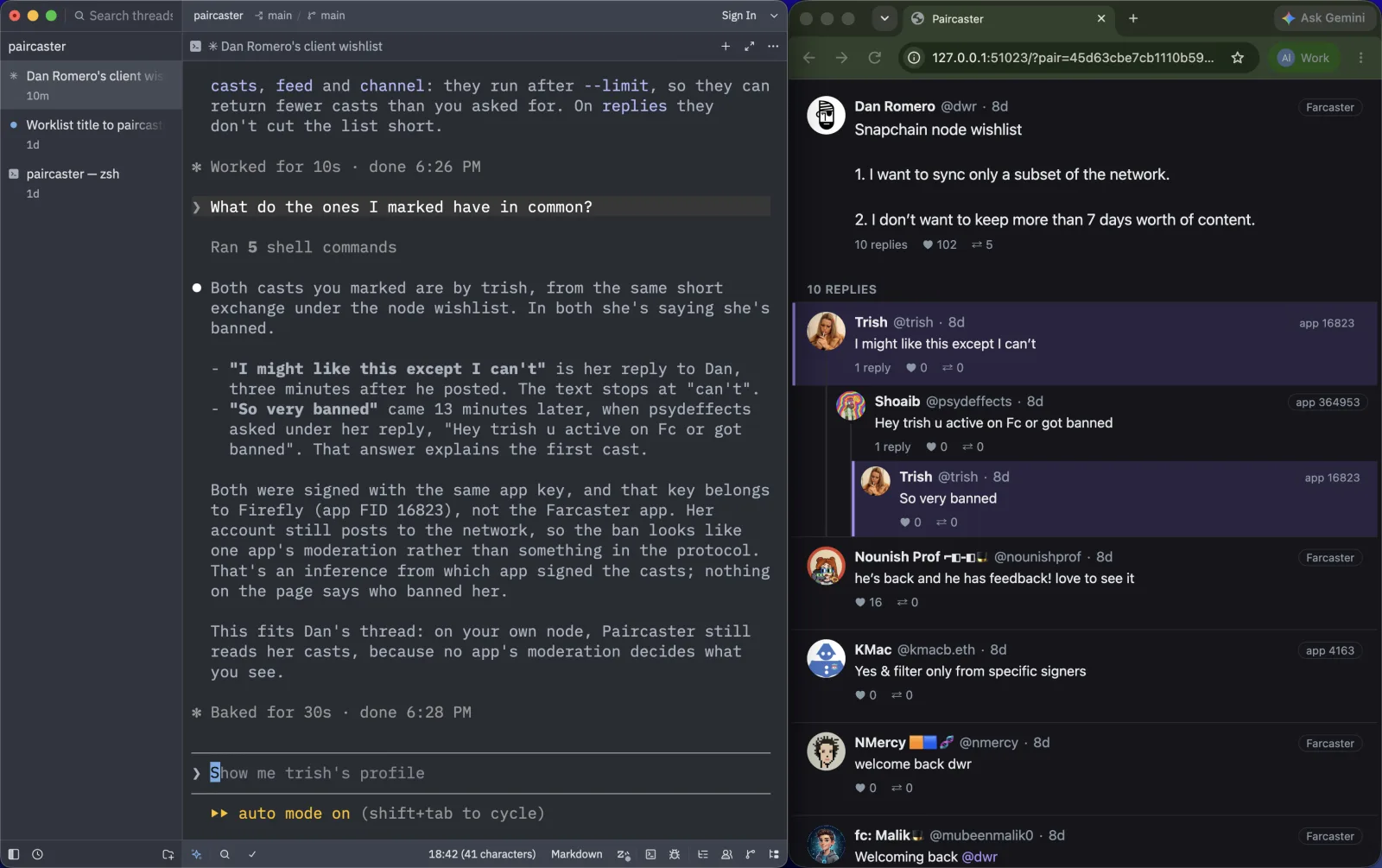
The agent can also put up an account: paircaster viewer open 'paircaster://paircaster/profile/3' shows Dan Romero's picture, bio and follow counts, and his 25 latest casts. With --images, an image in a cast is drawn in its card:
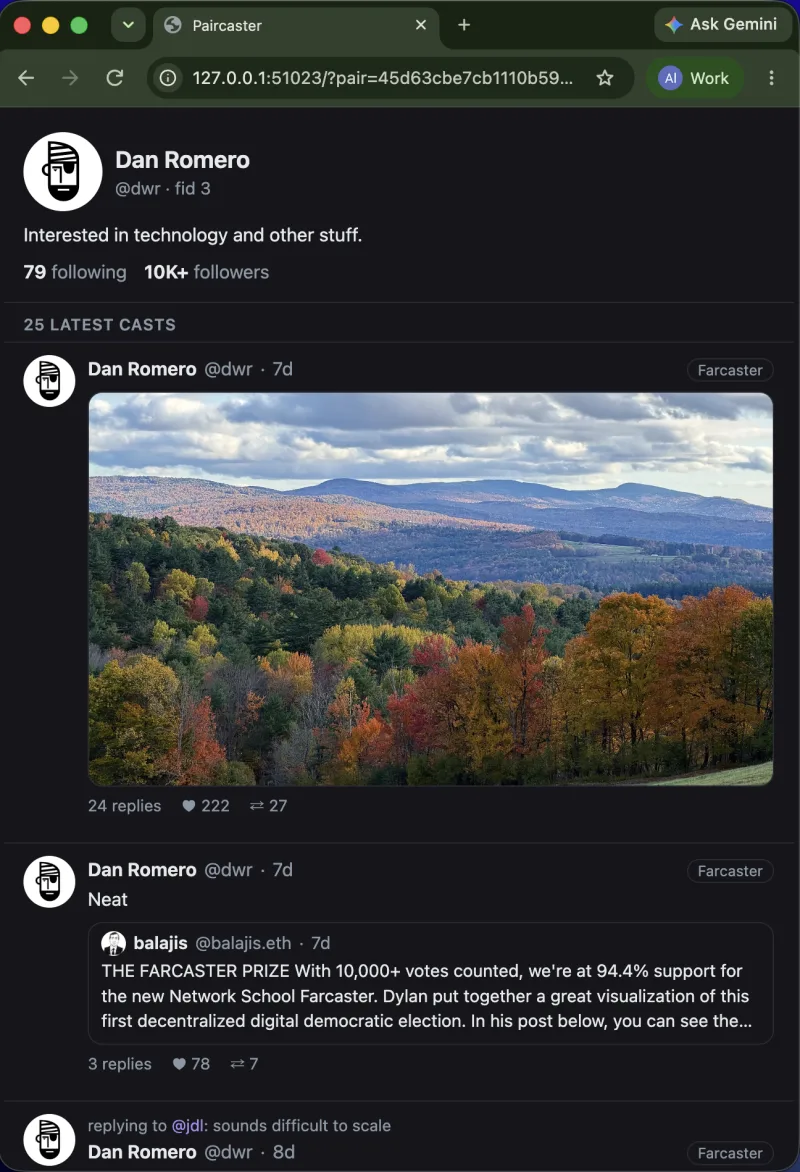
Next: What you can do with it